Sandbox Environment Testing
Complete development debugging and test acceptance in the sandbox environment. You can only apply to go live in the production environment after passing all tests.
Configure Test Parameters
Configure the sandbox parameters obtained in the “Pre-Development Preparation” step into your code:
- Test App ID
- Test Merchant ID
- API Key / Signing Secret (depending on your integration method)
Add Test Device (Optional)
Applicable Scenario: If you selected Local Integration, you need to bind a test device to the sandbox environment.
-
Go to Payment Integration Page
- Log in to the Connect portal
- Go to “Payment Integration” → select your application → “Configuration” tab
-
Add Test Device
- In the “Test Devices” section, scan barcode or enter device SN
- Click “Add” to complete binding
Important Note:
- A device can only be bound to one merchant at a time. If the device was previously bound to another merchant, please unbind first
- Test device transactions in sandbox environment are simulated with no real fund transfer
- After testing is complete and before going to production, unbind from test merchant first, then bind to production merchant
Select Integration Scope
Select the integration scope you need to test in the Connect portal:
-
Go to Integration Testing Tab
- Go to “Payment Integration” → select your application → “Integration Testing” tab
-
Select Integration Scope
- Based on your business needs, select the functional modules to be tested (e.g., payment, refund, query, etc.)
- The system will generate corresponding test case collections based on your selection
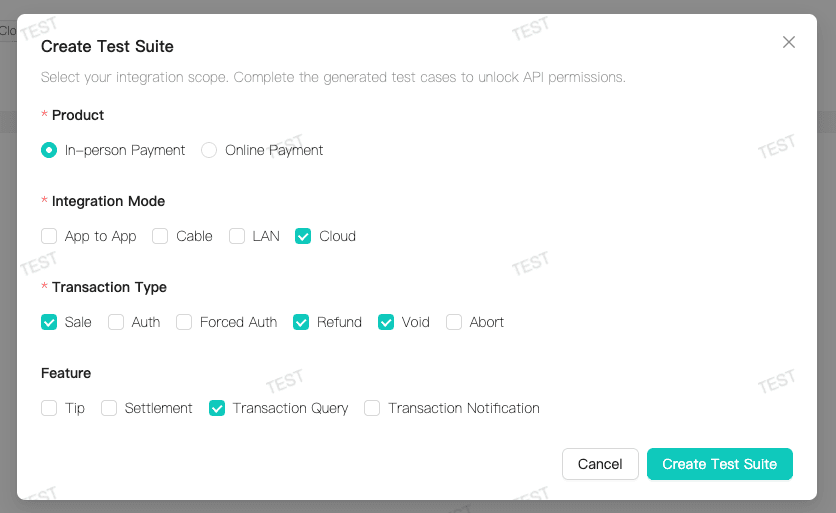
Create Test Suite
After selecting the integration scope, create a test suite:
-
View Test Suite
- The system automatically generates test case collections based on your selected integration scope
- Each suite contains several test cases covering key scenarios for that functionality
-
Understand Test Requirements
- Each test case includes: test purpose, test steps, and expected results
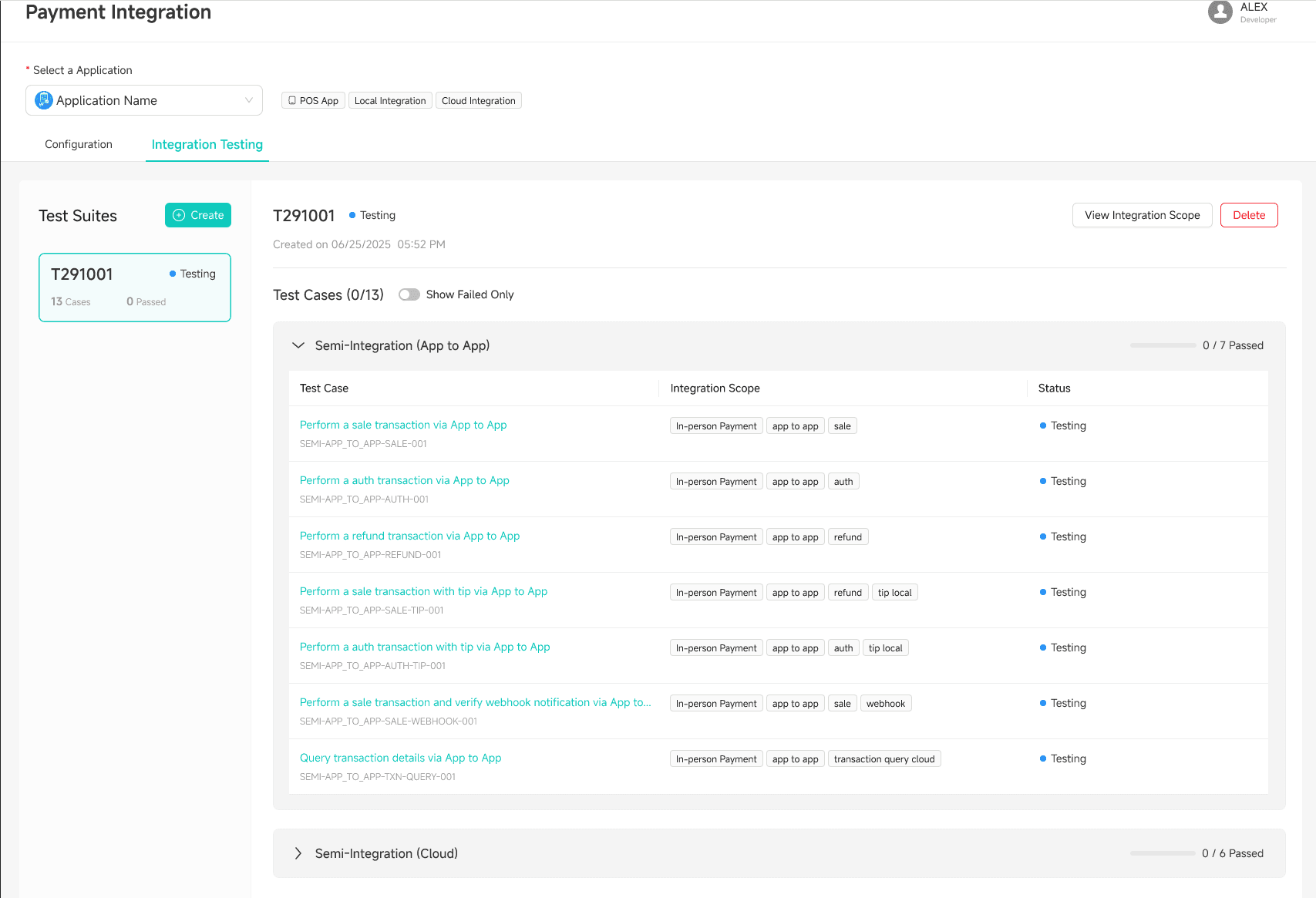
Run Tests
Execute tests in the sandbox environment according to the test case requirements:
-
Start Test
- Click “Start Test” to begin running the test
- Follow the case requirements and initiate the corresponding API requests through your application
-
Automatic Verification
- The system automatically captures your API requests and verifies the results
- Cases that pass verification will be marked as passed
-
Handle Test Results
- All passed: Test acceptance is complete, you automatically obtain production environment access for the corresponding APIs and can apply to go live
- Some failed: Fix your code based on the failure reasons and retest
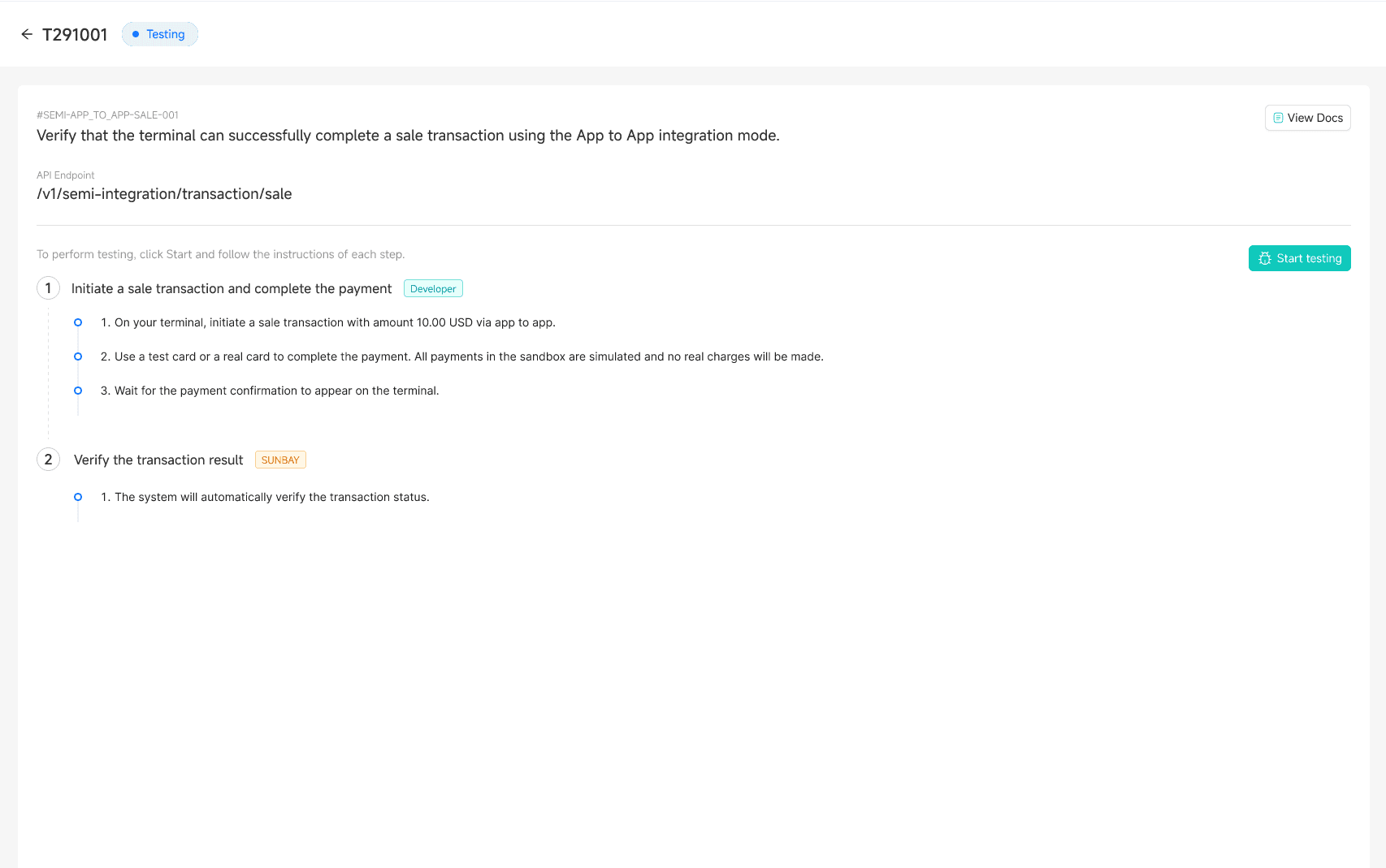
Once all test cases pass, test acceptance is complete and you can proceed to the production preparation phase.
FAQ
Why is test acceptance required?
Test acceptance ensures you correctly understand and use the APIs, avoiding problems in production. You can only apply to go live after passing test acceptance.
What if the test does not pass?
The system will clearly indicate the reason for failure. Common reasons include:
- Incorrect request parameters
- Results do not meet expectations
- Required exception scenarios not covered
After fixing your code based on the prompts, you can rerun the test.
Can I skip test acceptance?
No. Test acceptance is a required step before going live to production, ensuring your integration meets standards.
Can test parameters be used in production environment?
Absolutely not. Sandbox parameters can only be used in the sandbox environment. Production environment must use production parameters. Mixing them will cause transaction failures or security issues.
How to test new features after the application is already in production?
Select the new integration scope in “Integration Testing”, create the corresponding test suite and run it. The sandbox and production environments are completely isolated and will not affect your live business.
Complete! After passing test acceptance, you can proceed with Production Preparation.